
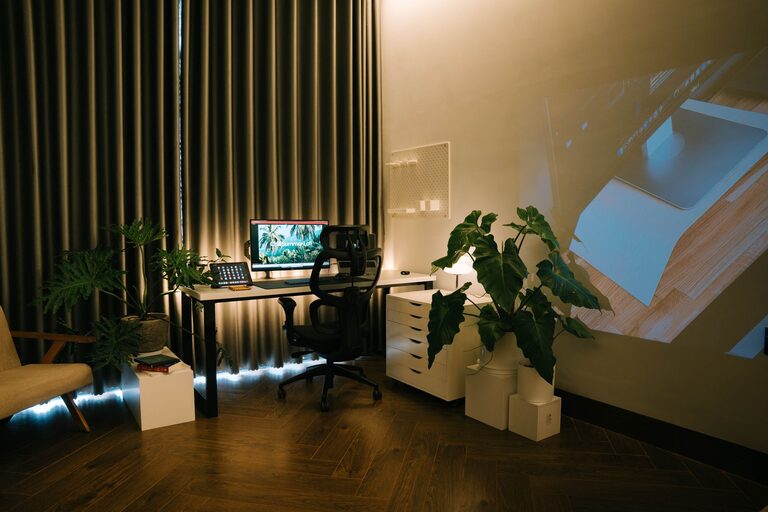
Creating a relaxing home workspace is essential for maintaining productivity and well-being, especially when you spend long hours working from home. A comfortable and calming environment helps reduce stress, improve focus, and keep your motivation high. Whether you have a dedicated office room or a small corner in your living space, there are many ways to design a workspace that feels inviting and supports your daily tasks.
In this guide, we’ll explore practical tips and ideas to help you create a relaxing home workspace that enhances both comfort and efficiency.
Why a Relaxing Workspace Matters
Your workspace is more than just a place to put your computer and papers. It influences how you feel, work, and interact with your tasks. A cluttered, chaotic area can increase stress and distract you, while a neat, well-thought-out space promotes calmness and focus.
When you create a workspace that feels good to be in, you’re more likely to enjoy your workday and maintain a healthy work-life balance.
Choose the Right Location
Find a Quiet, Well-Lit Spot
Select a space with minimal distractions, preferably away from household noise. Natural light is a key element of a relaxing workspace. If possible, position your desk near a window to benefit from daylight, which can boost mood and energy.
Make It Your Own
Even if the space is small, personalize it. Add items that make you happy or inspire you such as plants, artwork, or photos. Personal touches make the area welcoming and encourage you to spend time there.
Organize for Simplicity
Declutter Your Desk
A clean desk clears your mind. Remove unnecessary items and only keep essentials like your computer, notebook, and a pen holder. Use drawers or storage boxes to keep supplies out of sight but within reach.
Use Storage Solutions
Invest in shelves, filing cabinets, or desk organizers to keep papers and tools neatly arranged. Label folders and containers to find what you need quickly, reducing frustration and saving time.
Choose Comfortable and Supportive Furniture
Select a Good Chair
A comfortable chair with proper lumbar support is crucial. It helps prevent back pain and keeps you comfortable during long work sessions. Adjustable features enable you to customize the chair for your posture.
Opt for a Suitable Desk
Choose a desk that fits your space and work style. It should have enough surface area for your computer, documents, and other tools without feeling cramped. Standing desks or adjustable desks can also add flexibility.
Mind the Lighting
Balance Natural and Artificial Light
While natural daylight is ideal, supplement it with soft, adjustable artificial lighting to avoid eye strain as the day ends. Desk lamps with warm bulbs create a cozy atmosphere without glare.
Avoid Screen Glare
Position your monitor to minimize reflections from windows or lights. Use anti-glare screen protectors if necessary.
Add Calming Elements
Bring in Plants
Indoor plants improve air quality and add a touch of nature, which can reduce stress and boost creativity. Low-maintenance plants like succulents, snake plants, or pothos are great options.
Use Soothing Colors
Choose calming colors for your workspace décor and accessories. Soft blues, greens, or neutrals are known to have a relaxing effect.
Incorporate Relaxation Tools
Items like essential oil diffusers, stress balls, or a small water fountain can add a peaceful vibe to your workspace.
Manage Noise Effectively
Use Noise-Canceling Headphones
If household sounds or outside noise are distracting, noise-canceling headphones can provide a focused work environment.
Play Background Music
Soft instrumental music or nature sounds can help maintain concentration without interfering with your work.
Establish Boundaries and Routine
Set Work Hours
Define when your workday begins and ends to help separate work time from personal time. This boundary reduces burnout and encourages relaxation outside of work.
Take Breaks
Regular breaks refresh your mind. Stretch, walk around, or practice brief mindfulness exercises to reduce tension.
Keep Technology Organized and Updated
Manage Cables
Use cable organizers to keep cords tidy and prevent clutter.
Maintain Your Devices
Keep your computer and other devices updated and running smoothly to avoid frustration.
Final Thoughts
Designing a relaxing home workspace is about balancing functionality with comfort. By selecting the right location, organizing efficiently, choosing comfortable furniture, managing lighting and noise, and adding personal, calming touches, you can create a space that supports focus and well-being. Remember, your workspace should serve you — making your workday feel less stressful and more enjoyable.
Take the time to tailor your setup, and you’ll likely notice a positive difference in your productivity and mood. Enjoy creating your perfect home workspace!